

Dqrkis External
Dqrkis is a lightweight Minecraft PvP client with 50+ modules for Crystal PvP, combat automation, and DonutSMP utilities.
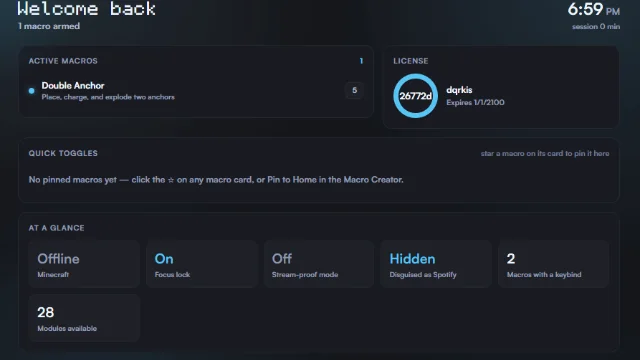
About Dqrkis External
Dqrkis External is a feature-packed Minecraft PvP external client designed for competitive players, Crystal PvP enthusiasts, and DonutSMP players. Featuring 50+ modules across 7 categories, it combines advanced combat automation, visual enhancements, and specialised server utilities.
With a strong focus on Crystal PvP, Dqrkis includes powerful combat tools such as Auto Crystal, Anchor Macro, TriggerBot, Auto Mace, and Double Anchor. It also provides dedicated modules for potion-based combat and cart PvP.
Beyond combat, Dqrkis offers a collection of DonutSMP-specific utilities designed to help players automate tasks, discover hidden bases, and improve their server experience.
Key Features
- Crystal PvP Combat – Auto Crystal, Anchor Macro, Double Anchor, Auto Mace, TriggerBot, and more.
- DonutSMP Utilities – Includes RTF Base Finder, Tunnel Base Finder, SpawnerProtect, AuctionSniper, AutoSell, and CrateBuyer.
- Basefinding Tools – Specialised tools for locating hidden bases and identifying valuable locations.
- Potion PvP – Aim Assist, Auto Pot, NethPot, Auto Web, and potion refill automation.
- Visual Enhancements – ESP, NameTags, Glow, HUD, and other rendering modules.
- Automation – AutoReconnect, XP Macro, AutoTreeFarmer, AutoShulker, and more.
- Custom Configurations – Customise individual modules, save configurations, and switch between setups.
Dqrkis is ideal for Minecraft PvP players, Crystal PvP enthusiasts, and DonutSMP players looking for a lightweight client with extensive combat and automation features.
Menu Key: F12.
Features
- 50+ Combat & Utility Modules
- Advanced Crystal PvP Automation
- Dedicated DonutSMP Basefinding Tools
How to install Dqrkis External
4 steps. Takes about 2 minutes.
-
Step 1: Download Dqrkis External
Choose the file that matches Minecraft external. Only download from the buttons below.
-
Step 2: Download the exe.
-
Step 3: double click the exe.
-
Step 4: enter anything into the license field and press enter.
Stuck? See the troubleshooting guide.